Designing for Sally: Turning Dashboards into Decision-Making Tools for Impact-Driven Employers

Internal tooling impact

B2B2C

Modular design
👀 Setting the scene: Why Control Center needed a reset

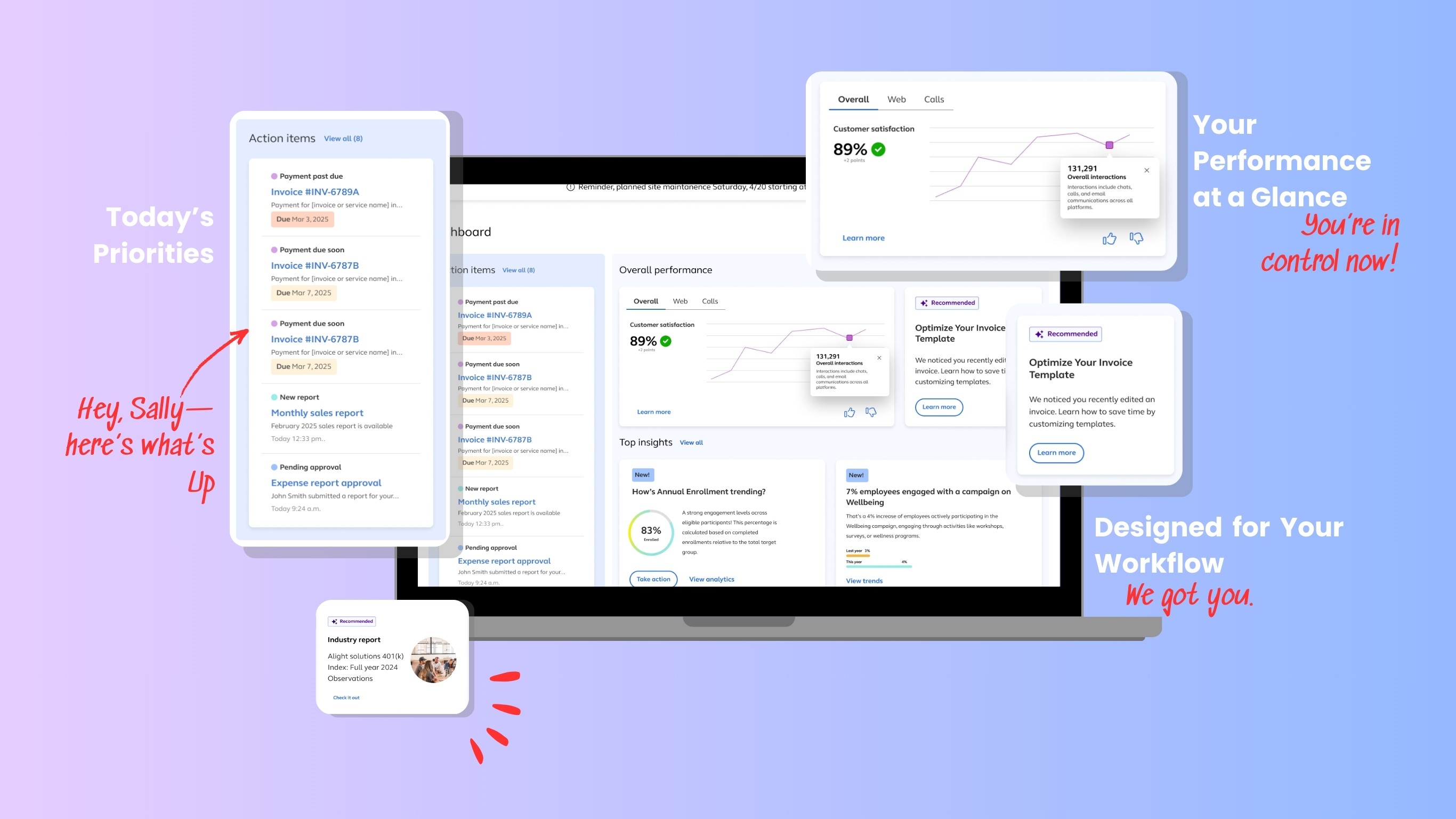
The Control Center is a foundational internal platform employers use to manage employee programs, benefits, and content. When employers log into it, they’re under pressure. They need to see what matters, act on it quickly and track impact. Yet the homepage they used was a patchwork of static tables and scattered data: more noise than guidance. I led the redesign of the homepage into a personalized, task-focused dashboard that helps users prioritize work, understand key metrics, and feel in control.

Timeline: Dec 2024 – Apr 2025

Team: Sr. Product Designer, Product Designer,

Product Manager, Engineer

Role: Product Designer

🤯 Sally was stuck in a cluttered homepage. It was designed to show everything yet made it difficult to do anything.

Employers used the tool to make time-sensitive decisions across programs and platforms. But:

  • There were plenty of ways to take action—but no insight into how those actions impacted employees, leaving users unsure of where to focus or how to drive meaningful outcomes.

  • Even when insights were available, there was little guidance on how to act on them or tie them back to employee outcomes.

  • There was no visual hierarchy guiding what mattered now.

"It shows a lot… and it makes it hard to do anything."

– Internal feedback

How might we help Sally move from confusion to clarity the moment she logs in?
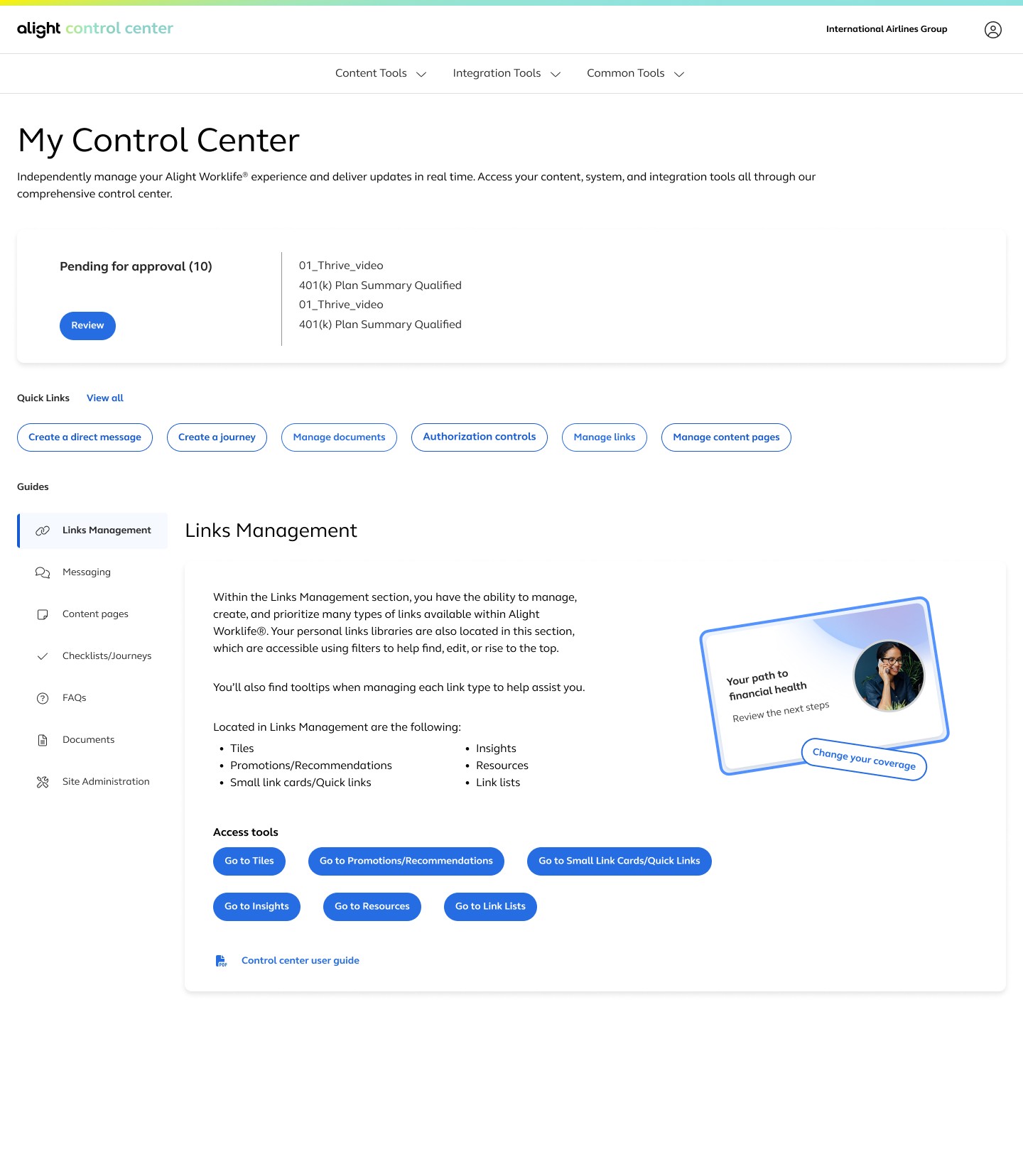
The landing page is extremely text heavy with long descriptions. No visual hierarchy and no clear starting path.

The interface lists everything equally.

Disconnected tools, everything lives separately and the navigation in the tabs gets complicated.

Support links are stiff and don't relate to tasks users are completing.

Every employer sees the same layout and same information, even if their needs differ.

✅ Opportunity

Design a structured entry point where users immediately see what's important.

✅ Opportunity

Introduce action prioritization: status, critical items.

✅ Opportunity

Create a dashboard that centralizes information

✅ Opportunity

Integrate easy access to Help Center and contextual support directly into the landing page.

✅ Opportunity

Create a personalized dashboard with employe-specific cards, metrics and content

The landing page is extremely text heavy with long descriptions. No visual hierarchy and no clear starting path.

The interface lists everything equally.

Disconnected tools, everything lives separately and the navigation in the tabs gets complicated.

Support links are stiff and don't relate to tasks users are completing.

Every employer sees the same layout and same information, even if their needs differ.

✅ Opportunity

Design a structured entry point where users immediately see what's important.

✅ Opportunity

Introduce action prioritization: status, critical items.

✅ Opportunity

Create a dashboard that centralizes information

✅ Opportunity

Integrate easy access to Help Center and contextual support directly into the landing page.

✅ Opportunity

Create a personalized dashboard with employe-specific cards, metrics and content

The landing page is extremely text heavy with long descriptions. No visual hierarchy and no clear starting path.

The interface lists everything equally.

Disconnected tools, everything lives separately and the navigation in the tabs gets complicated.

Support links are stiff and don't relate to tasks users are completing.

Every employer sees the same layout and same information, even if their needs differ.

✅ Opportunity

Design a structured entry point where users immediately see what's important.

✅ Opportunity

Introduce action prioritization: status, critical items.

✅ Opportunity

Create a dashboard that centralizes information

✅ Opportunity

Integrate easy access to Help Center and contextual support directly into the landing page.

✅ Opportunity

Create a personalized dashboard with employe-specific cards, metrics and content

🧭 Shifting the focus from passive information to active decision-making.

Instead of asking “Where do I find X?”, I asked “What should I act on today?” That single change grounded every design decision moving forward.

  • Prioritize action over passive data

  • Make insights digestible and dynamic

  • Support personalization based on recent activity

  • Surface only what’s essential upfront

  • Design for configurability and scale

My target contributions:

→ Led homepage architecture revamp through wireframes and Miro mapping

→ Introduced the Action Center concept to surface time-sensitive tasks

→ Defined modular card system for personalization and flexibility

🔄 Braking it down: iterating toward the right solution

To redesign Control Center in a way that genuinely supported employers, I followed a flexible but structured design loop inspired by the Double Diamond. I spent time understanding where the experience broke down, defining the real problems, exploring multiple directions, and iterating quickly with cross-functional partners.

This process gave me the foundation to move confidently into structural design decisions. With the problems clearly defined, I began mapping the employer journey, restructuring the information architecture, and shaping the layout through wireframe explorations.

Each step helped clarify what employers needed and how to surface the right information at the right moment.
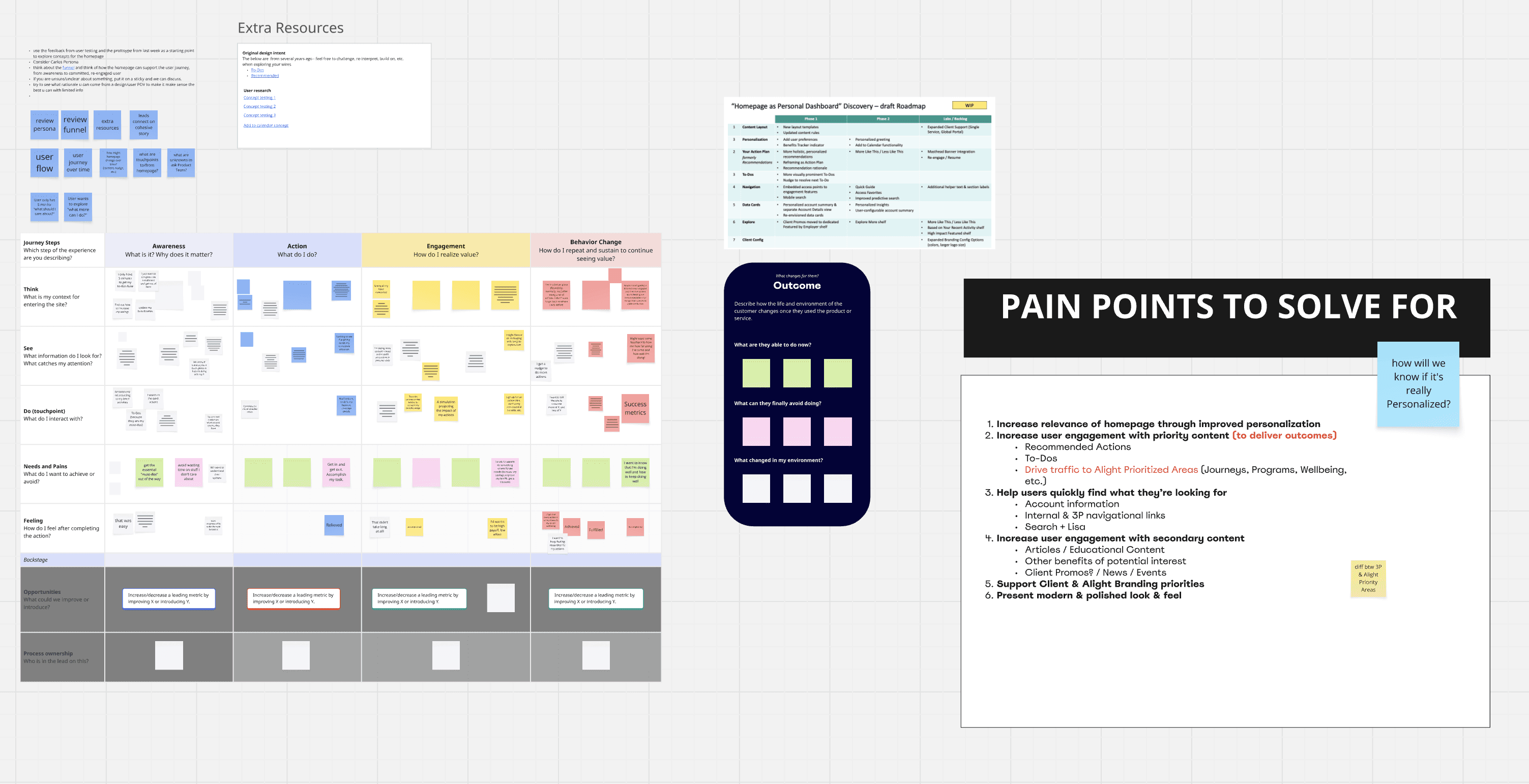
I examined employer workflows end-to-end to uncover emotional drop-offs, misplaced content, and missed opportunities for guidance. This clarified the moments where employers lost momentum and informed the hierarchy of the new dashboard.
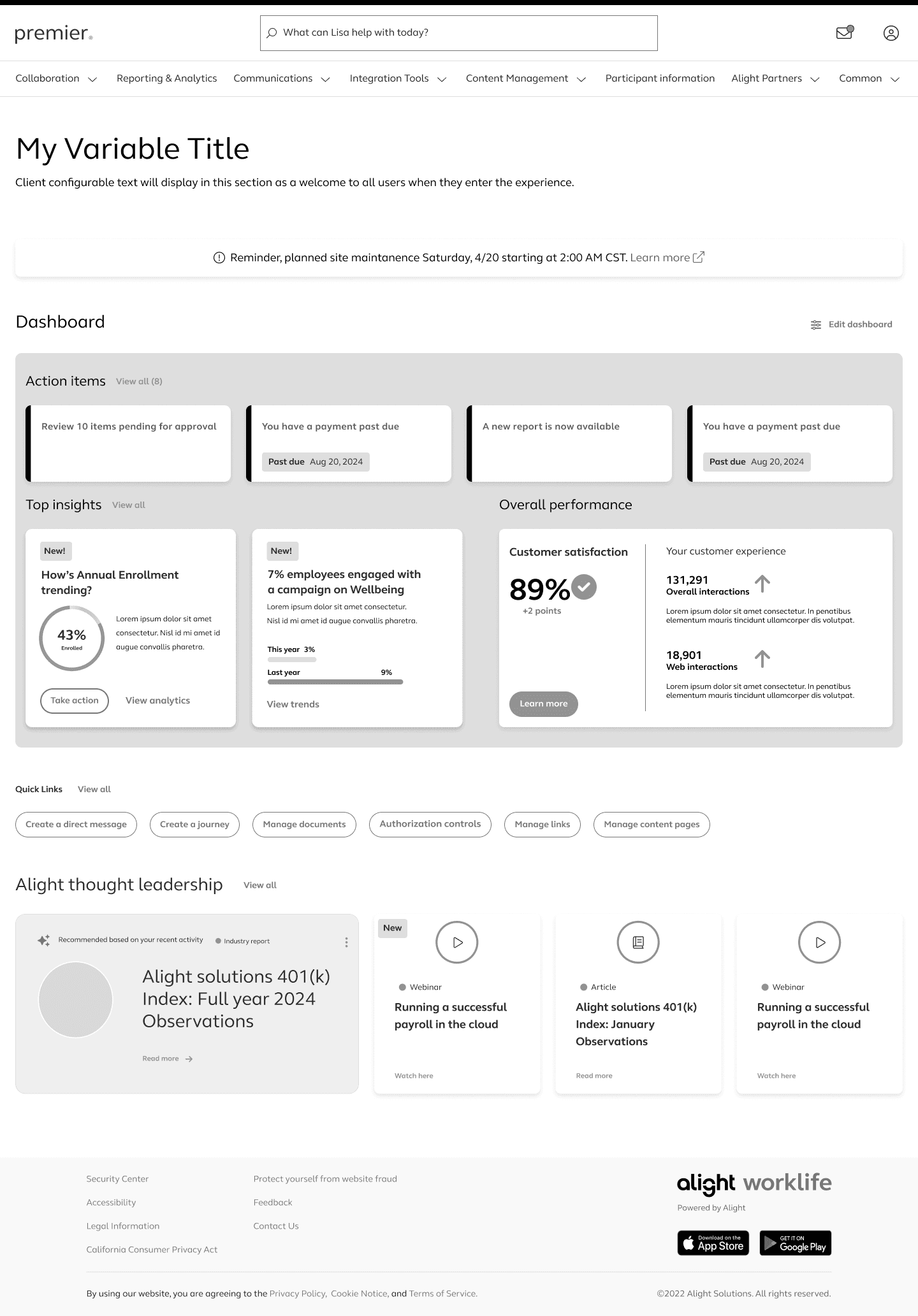
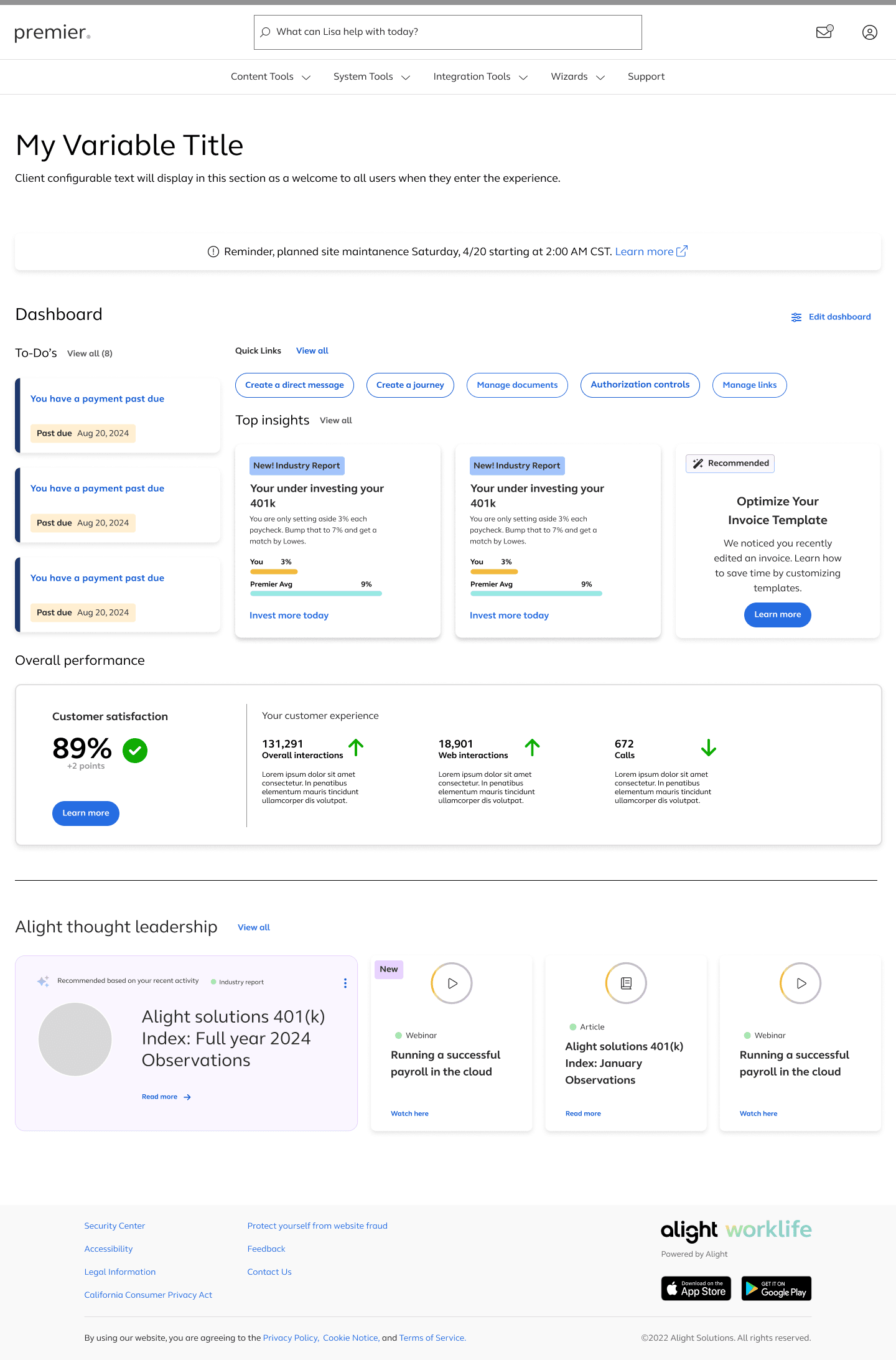
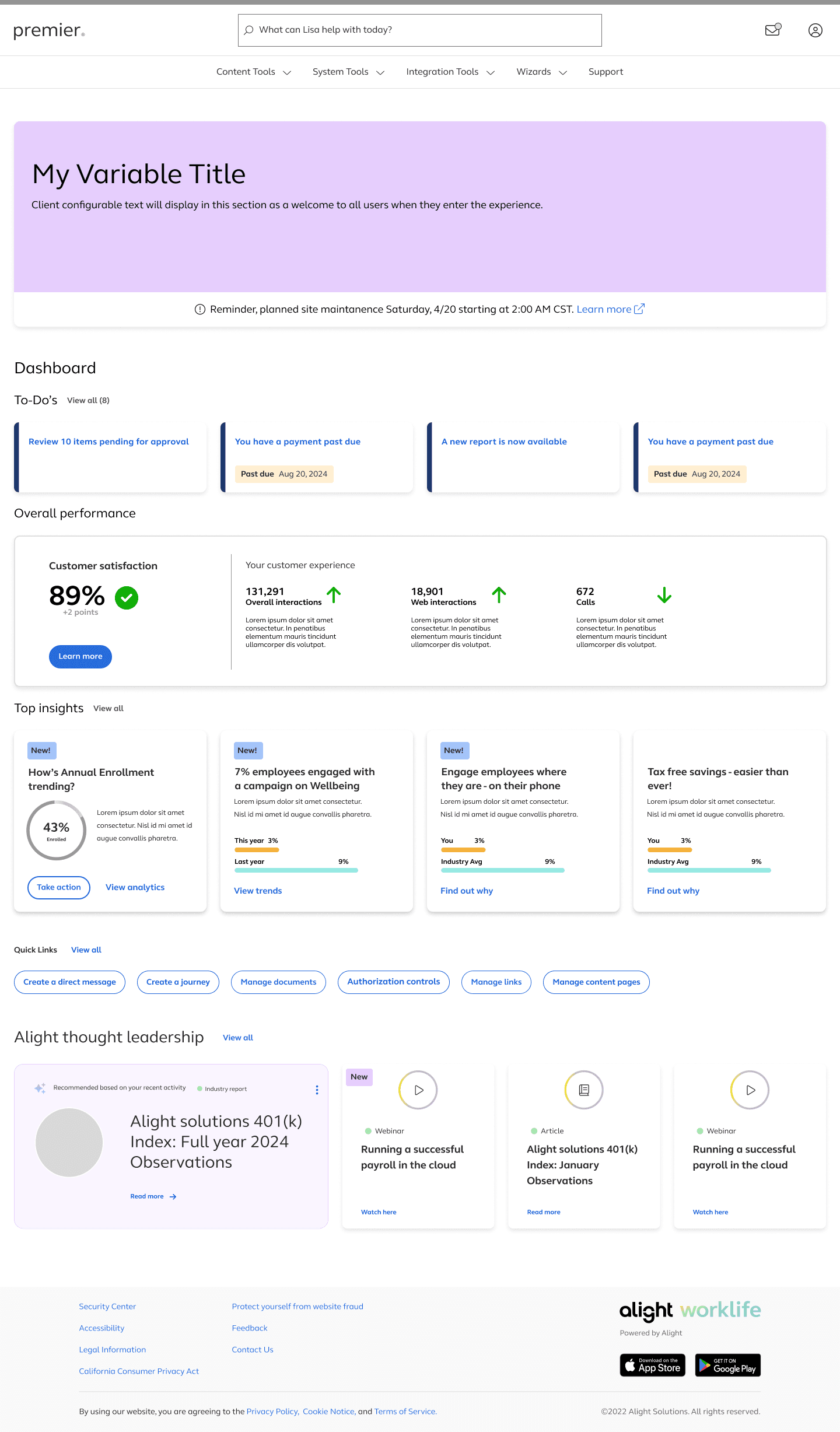
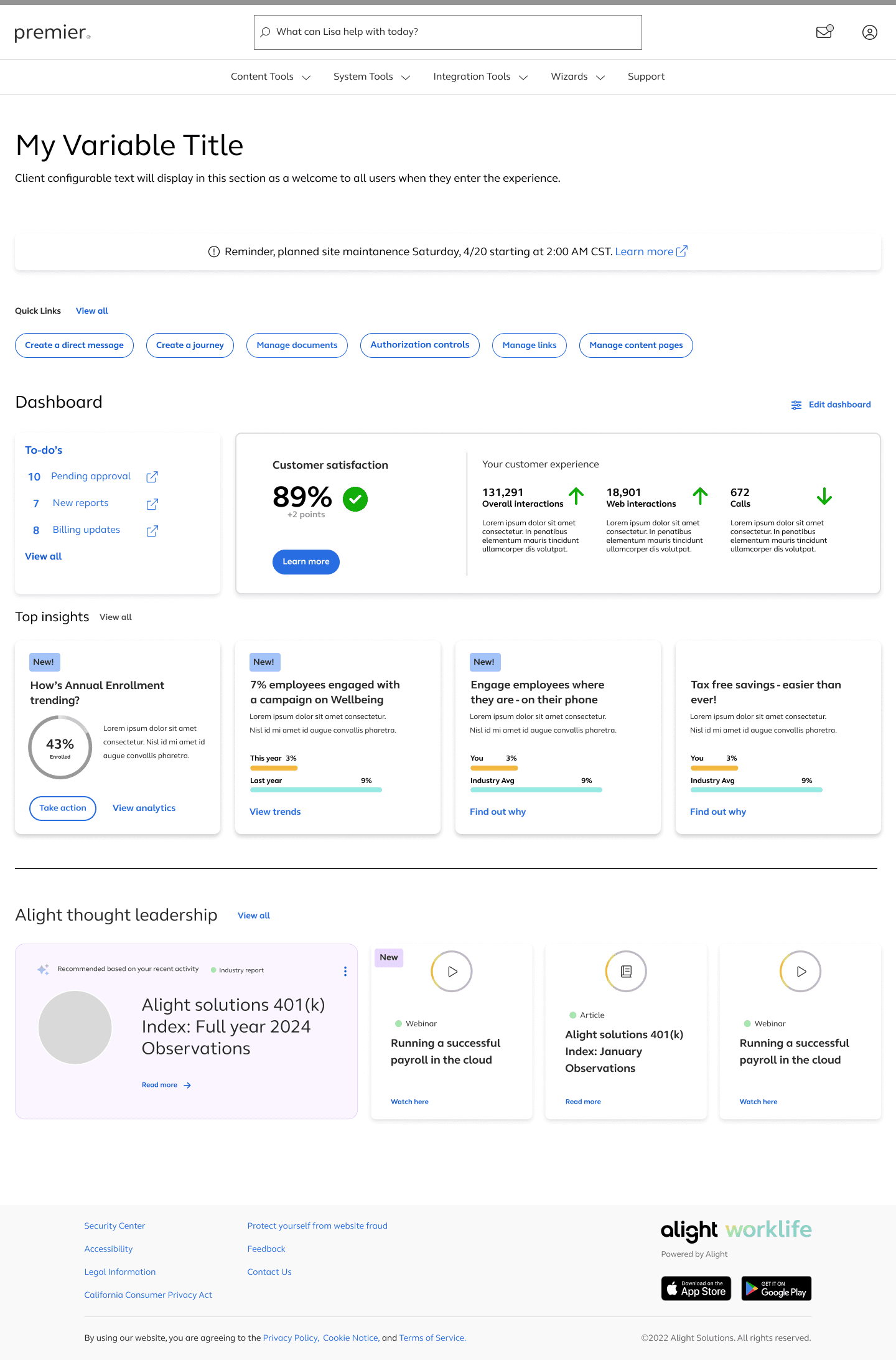
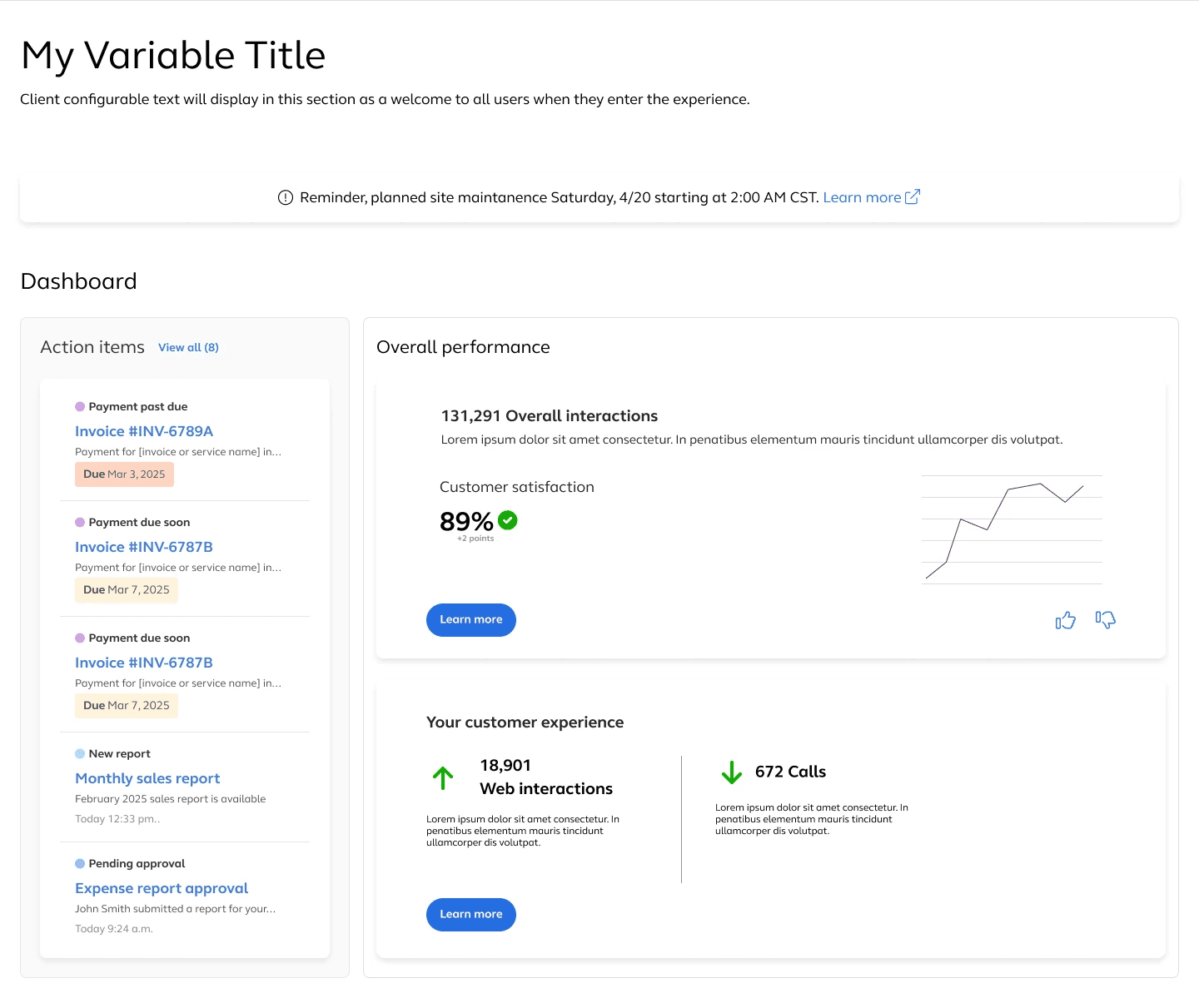
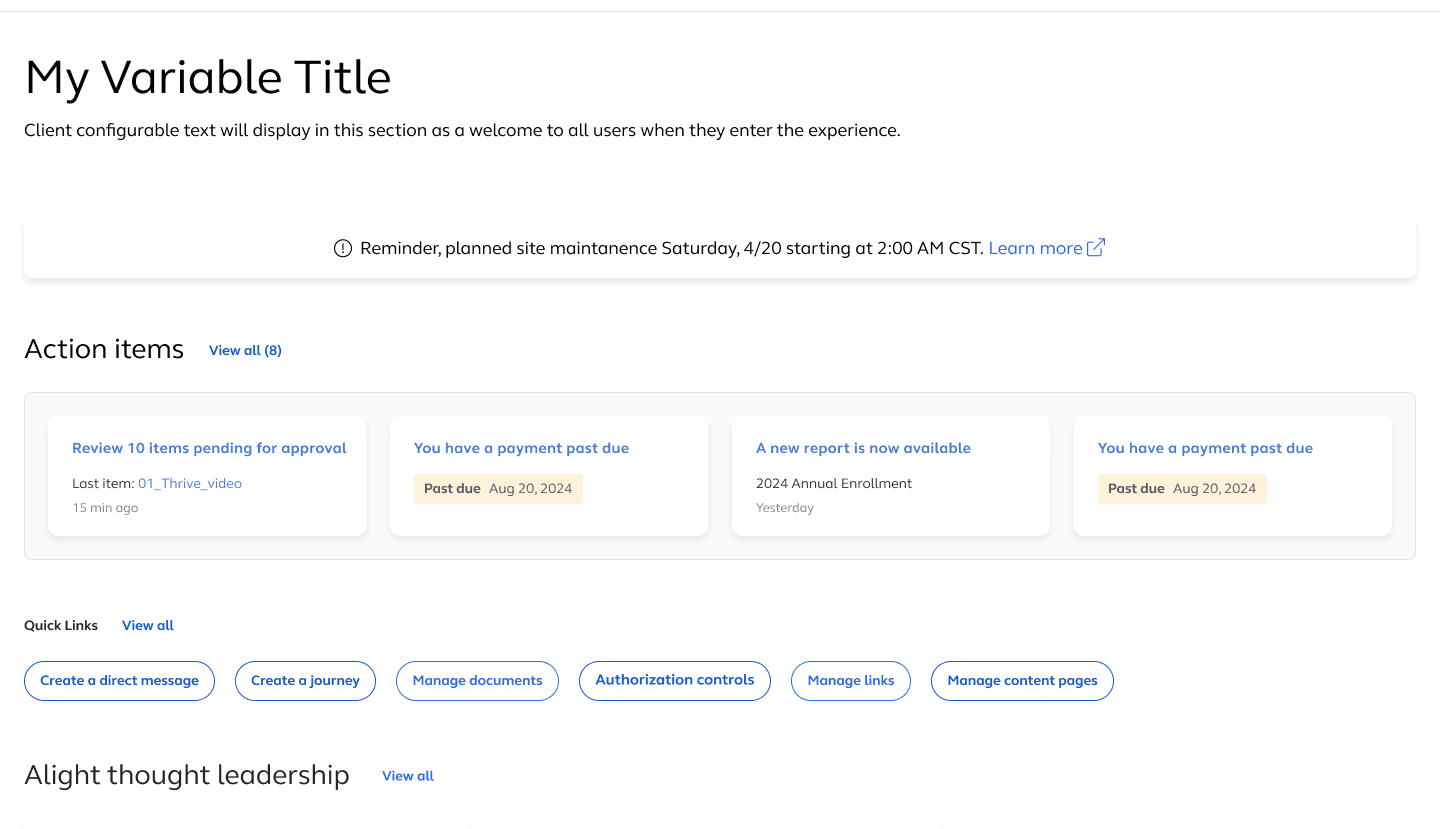
I explored multiple layout variations to balance clarity, data density, and action visibility. These explorations helped validate the structure of the Action Center, insight cards, and quick-link tools.
A robust dashboard isn’t defined only by its ideal state.

A robust dashboard isn’t defined only by its ideal state.

A robust dashboard isn’t defined only by its ideal state.

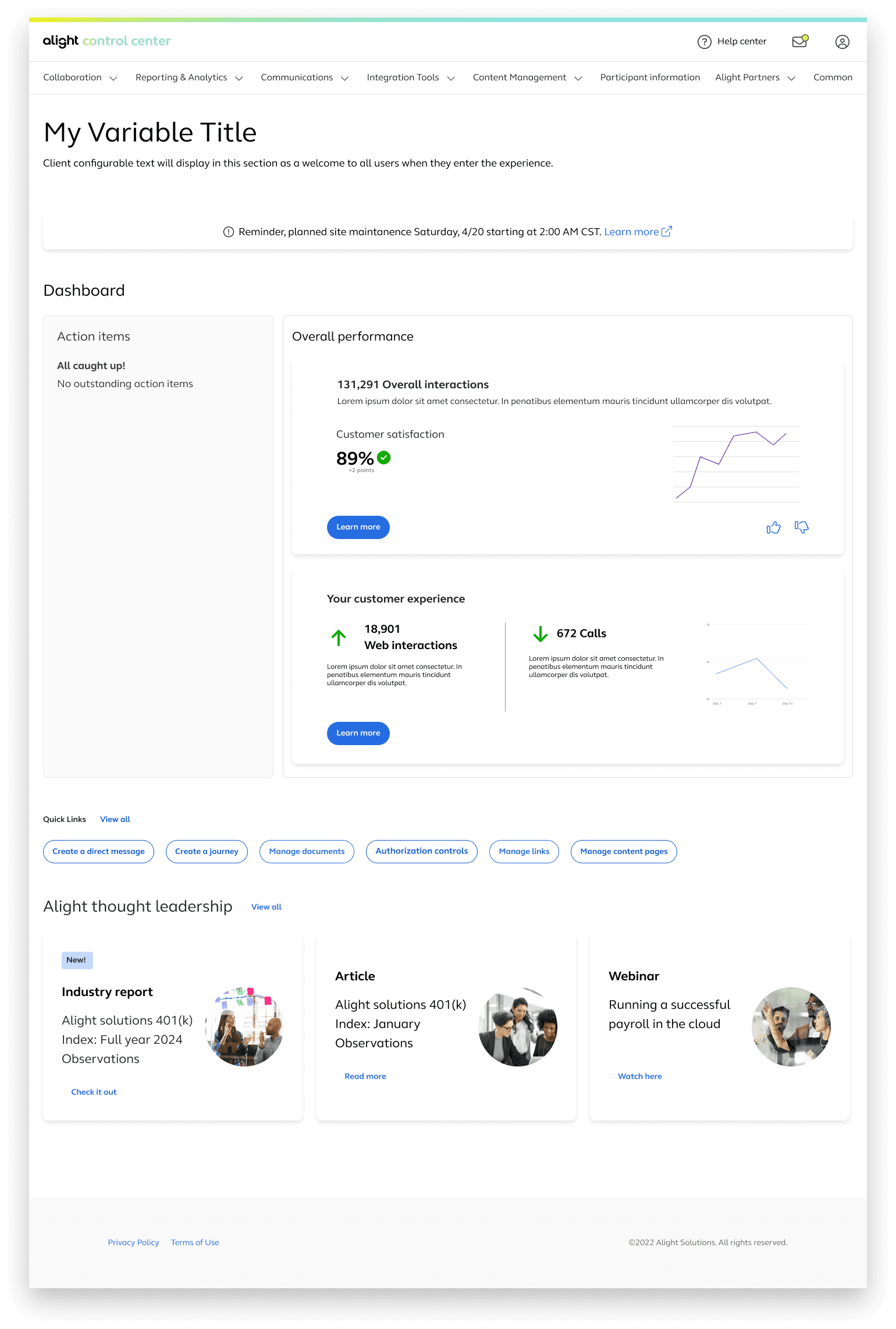
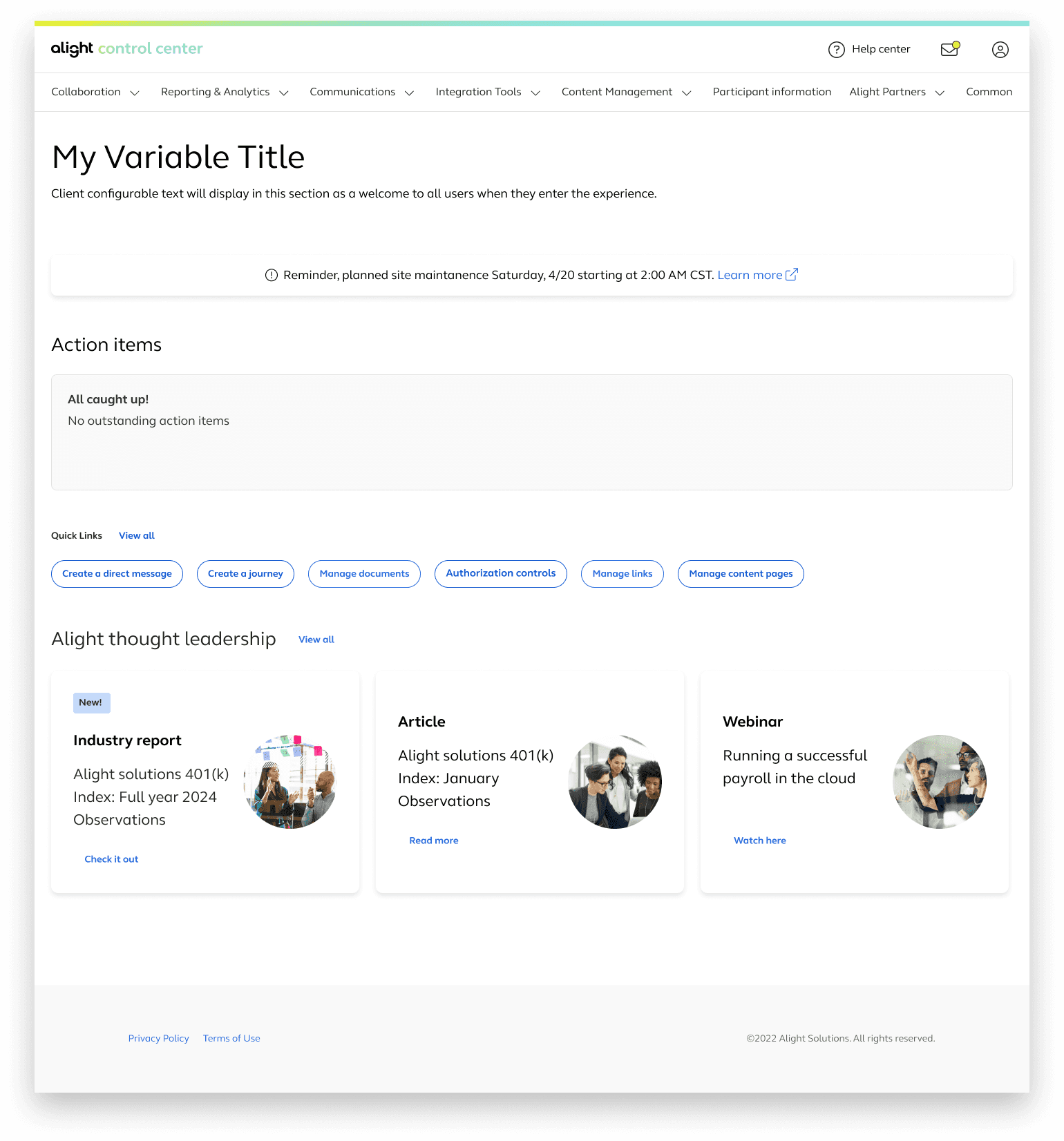
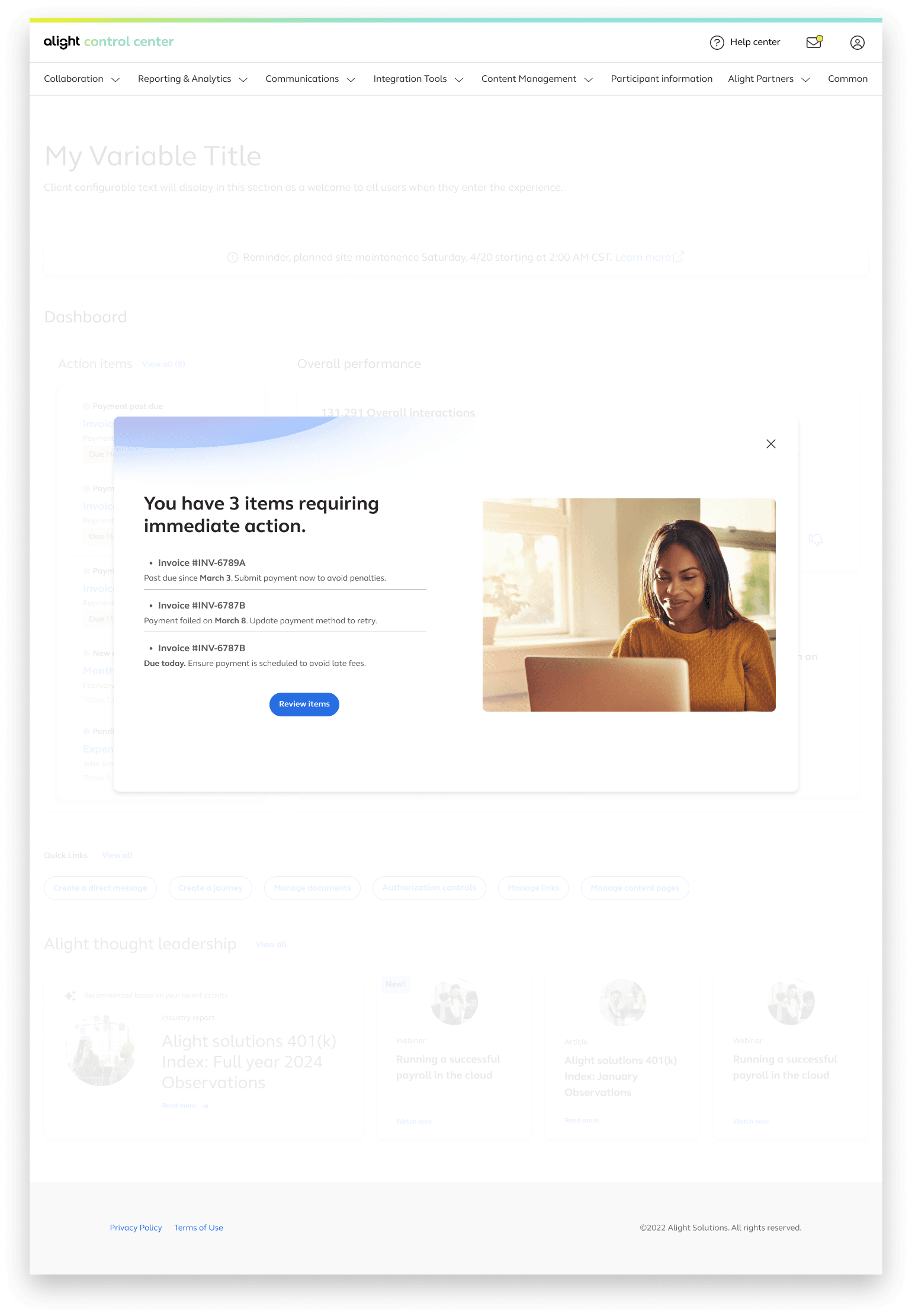
Beyond designing the main dashboard, I explored how the experience should behave when data is missing, when critical items need attention, and when tasks become overwhelming. These flows helped ensure that the Control Center remained usable and supportive across all states.

Beyond designing the main dashboard, I explored how the experience should behave when data is missing, when critical items need attention, and when tasks become overwhelming. These flows helped ensure that the Control Center remained usable and supportive across all states.

Beyond designing the main dashboard, I explored how the experience should behave when data is missing, when critical items need attention, and when tasks become overwhelming. These flows helped ensure that the Control Center remained usable and supportive across all states.

Empty states

Empty states

Empty states

Interstitial for critical items

Interstitial for critical items

Interstitial for critical items

Action items: View all

Action items: View all

Action items: View all

I explored multiple layout variations to balance clarity, data density, and action visibility. These explorations helped validate the structure of the Action Center, insight cards, and quick-link tools.
I explored multiple layout variations to balance clarity, data density, and action visibility. These explorations helped validate the structure of the Action Center, insight cards, and quick-link tools.
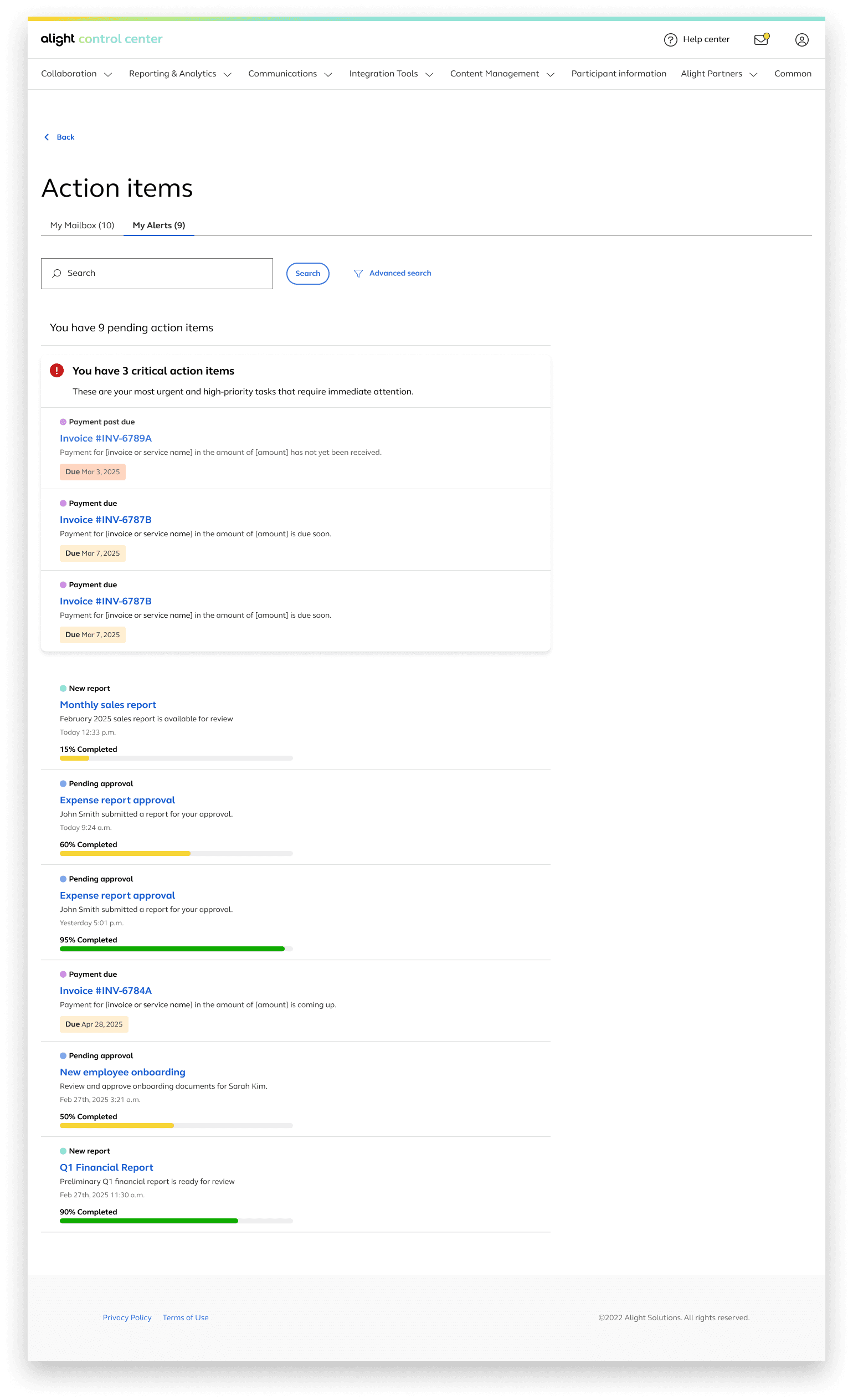
I explored multiple layout variations to balance clarity, data density, and action visibility. These explorations helped validate the structure of the Action Center, insight cards, and quick-link tools.

🔧 Balancing constraints with user needs

  • I designed a dual-path solution: one version buildable now, and a future version with advanced features.

  • A client insisted on an action item calendar, I advocated for a more impactful solution, helping the client see that action-item surfacing would drive faster decision-making.

Regular peer reviews helped me keep clarity and accessibility at the forefront, balancing business goals with real user needs. We carefully crafted microcopy—using terms like "Take action" or "Recommended" to subtly guide intent.

💡 Bringing clarity, personalization & scale to life
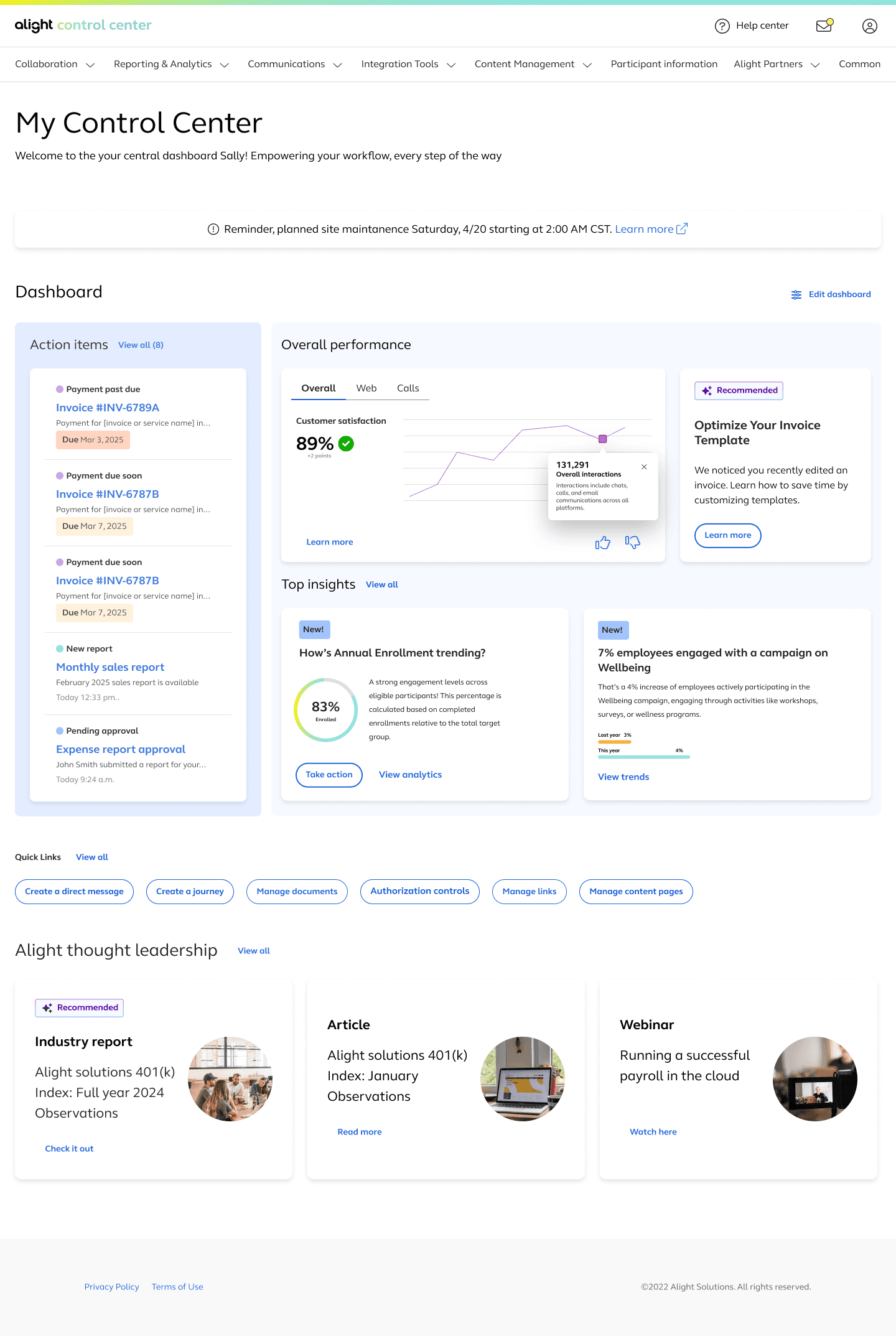
📌 Prioritize, Don't Just Present

Surfaces critical tasks ranked by urgency.


*We tested one version that grouped by category and one by urgency. Urgency-based sorting received better feedback.

🧱 Modular Cards – Design for Scale

Three client tiers: Full (all insights), Mid (insights + performance), and Lean (action items only). This ensured easy configuration without requiring full redesigns for different clients.

✨ Support Where It’s Needed

Inline help and tips appear only when needed—linked to the user’s active tool or data view. Inspired by the principle of progressive disclosure. We also surfaced intelligent suggestions based on recent activity.

📊 Engaging Data

Converted static, overwhelming cards into interactive, digestible components. Visual hierarchy and tabs help reduce cognitive load and allow fast comparisons. The top insights section anchors users with meaningful direction.

Why this design works?

Why this design works?

Why this design works?

The dashboard supports both micro and macro decision-making. Whether a user has 5 minutes or 2 hours, the layout provides a direct path to productivity and insight.

📌 Prioritize, Don't Just Present

Surfaces critical tasks ranked by urgency.


*We tested one version that grouped by category and one by urgency. Urgency-based sorting received better feedback.

🧱 Modular Cards – Design for Scale

Three client tiers: Full (all insights), Mid (insights + performance), and Lean (action items only). This ensured easy configuration without requiring full redesigns for different clients.

✨ Support Where It’s Needed

Inline help and tips appear only when needed—linked to the user’s active tool or data view. Inspired by the principle of progressive disclosure. We also surfaced intelligent suggestions based on recent activity.

📊 Engaging Data

Converted static, overwhelming cards into interactive, digestible components. Visual hierarchy and tabs help reduce cognitive load and allow fast comparisons. The top insights section anchors users with meaningful direction.

📌 Prioritize, Don't Just Present

Surfaces critical tasks ranked by urgency.

*We tested one version that grouped by category and one by urgency. Urgency-based sorting received better feedback.

🧱 Modular Cards – Design for Scale

Three client tiers: Full (all insights), Mid (insights + performance), and Lean (action items only). This ensured easy configuration without requiring full redesigns for different clients.

✨ Support Where It’s Needed

Inline help and tips appear only when needed—linked to the user’s active tool or data view. Inspired by the principle of progressive disclosure. We also surfaced intelligent suggestions based on recent activity.

📊 Engaging Data

Converted static, overwhelming cards into interactive, digestible components. Visual hierarchy and tabs help reduce cognitive load and allow fast comparisons. The top insights section anchors users with meaningful direction.

📈 Adoption, Clarity & Measurable Gains

What started as a cluttered, feedback-heavy interface turned into a bold bet on user-focused design. Despite tight deadlines and legacy constraints, we delivered a homepage that earned stakeholder praise, inspired internal adoption, and set a new standard for what a dashboard should feel like.

43%

Faster completion of top employer tasks after the homepage redesign.

43%

Faster completion of top employer tasks after the homepage redesign.

43%

Faster completion of top employer tasks after the homepage redesign.

112%

ROI improvement supported across aligned modernization initiatives.

112%

ROI improvement supported across aligned modernization initiatives.

112%

ROI improvement supported across aligned modernization initiatives.

30+

Enterprises and internal teams adopting the new dashboard model.

30+

Enterprises and internal teams adopting the new dashboard model.

30+

Enterprises and internal teams adopting the new dashboard model.

“Sally sees a trend, takes action, and sees impact—all from her homepage.”

– Leadership

Clarity in action: Employers no longer dig through data — it surfaces to them, prioritized.

Faster workflows: Personalized entry points reduced navigation friction significantly.

Endorsed by leadership: Became the reference model for all future internal dashboards.

Shared across teams: Presented as a showcase of scalable UI and thoughtful design.

What I learned & what's next

This project helped me grow from a visual problem-solver to a systems thinker. I learned to communicate vision under constraints, push for clarity with impact, and design not just for what exists, but for what's next.

In hindsight: I would’ve loved to test more interactions for the help zones, especially for users onboarding for the first time. It’s a future iteration I’m excited about.

Let's work together. 🫱🏻‍🫲🏽

Let's work together.

Or check out the Help Center redesign I created as part of the Control Center experience.